
I have been cleaning up the code on my site, and somehow triggered a problem. My gallery index page was public and when a guest clicked on an album thumbnail the login would pop up. Now the gallery index does not show any thumbnails to a non-logged in guest. Any idea if this is a security setting that I mistakenly altered or something else? I've double checked security settings.

Thanks Malte,
I think I have a setting problem.
I am using the zpBoostrap fork and 1.6.1b on my local install. I have reset the theme to default, fresh install of both, so the issue is caused by a setting that is passed from the previous settings.
This URL will show the index to a non-logged in guest (as desired):
https://localhost/gallery/page/gallery/
This will not:
Any suggestions as to what is set wrong? Thanks!
Using the Basic theme a non-logged in user will not see index but this URL does not work either - https://localhost/gallery/page/gallery/
zpBootstrap might have a home page options like Zenpage (sorry, don't remember off hand right now), so if that is not sset it might not show anything. Basic of course does not have that.
Generally if there is no error and not truncated html source no albums means generally either there are no albums or there are no published albums.
I rolled a live test site back to 1.6.1a and the security behavior returned to the way I had previously set up:
The gallery index page is viewable to the public. The top level albums thumbnails (which only contains folders) are viewable to the public.
When the public clicks on any thumbnail the login page pops up. A logged in user would see the next level of album/images.
This test site running 1.6.1a the index page demonstrates the behaior: https://www.loweprofile.com/memorybook/
Running 1.6.1b with the same setting, the public are unable to view the index page, and immediatly asked for a password upon page load.
I tested 4 themes:
Basic: displayed Index and login.
Zenpage: displayed Index and login.
ZPBootstrap. Index
Garland: login only
So far I have only tested ZPbootstrap on 1.6.1b which shows only a login to the public. Also new: all top level albums are "protected by parent" and show a "lock" icon.
The admin is set as below. /Settings/Options/Gallery/
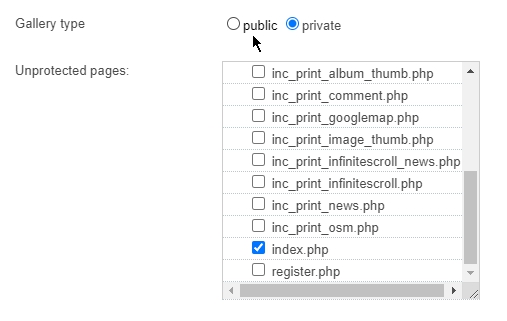
Of course if you set the gallery - which refers to the site in Zenphoto and not just albums - to private it is by definitioon not public in general so all pages are protected. Unless you log into via password.
If you want to galelry index to be public you need to set albums to protected and not the whole site.
I do understand but the old behaviour was simple not correct in the first place and for years. Inheritance and protection for sublevels was not properly for years so we had to fix and align it all properly.
If the site as the top parent of everything is protected all items below are as well.
I am sorry but your way will not be possible this way anymore. Private site just means private site. I described a workaround above.
You need to password protect all albums individually. Subalbums inherit from their parents. There is no other way to protect all otherwise as that is the private site/gallery.
For user rights you can (only) set rights for the toplevel albums for each user or user group.
I have tried a public site with logged in users able to see unpublished albums. But the published albums still do not show to the public.
As an ex commercial photographer I would think any commercial gallery would prefer that the public see the latest images on a home page without logging in, and then clicking on a thumbnail triggers the login.
Having a static page, which would need constant updating to stay current does not seem like a useful option, for an active professional.
I have tried a public site with logged in users able to see unpublished albums. But the published albums still do not show to the public.
Protected but published toplevel albums actually are displayed to the public actually and also listed in menus. They don't have a actual thumb but a lock default image as password protected albums always did because, well, the content is protected.
You can get the latest images even from protected albums but that requires custom coding.
I just reviewed options and indeed there seems to be a unwanted bug that disables the "unprotected pages" options. Actually checking for example gallery.php there should have it bypass the private status which is what you like to have (that works with the regstier.php page). I will take a look at that again.
I see that despite all the changes this should still be possible since that is what this option is for… Thanks for finding and inisting on this not working correctly.
I don't understand your response.
After looking into the code your are saying that I should be able to set my gallery index to display publicly using the existing 1.6.1b code?? 10 minutes before you stated you had found a bug.